What is SaaS? A Beginner’s Guide
Explore SaaS software with this beginner’s guide. Learn what SaaS is, how it works, its benefits, and why businesses use cloud-based software solutions.
Imagine you want to watch a movie. In the old days, you had to drive to a video rental store, buy or rent a physical DVD, bring it home, and pop it into a dedicated player connected to your TV. Today, you simply open a streaming app on your laptop or phone and start watching instantly.
That is exactly how SaaS, or Software as a Service, has transformed the world of computer programs. It has transformed software from a product you install manually into a service you can access instantly online.
What is Software as a Service?
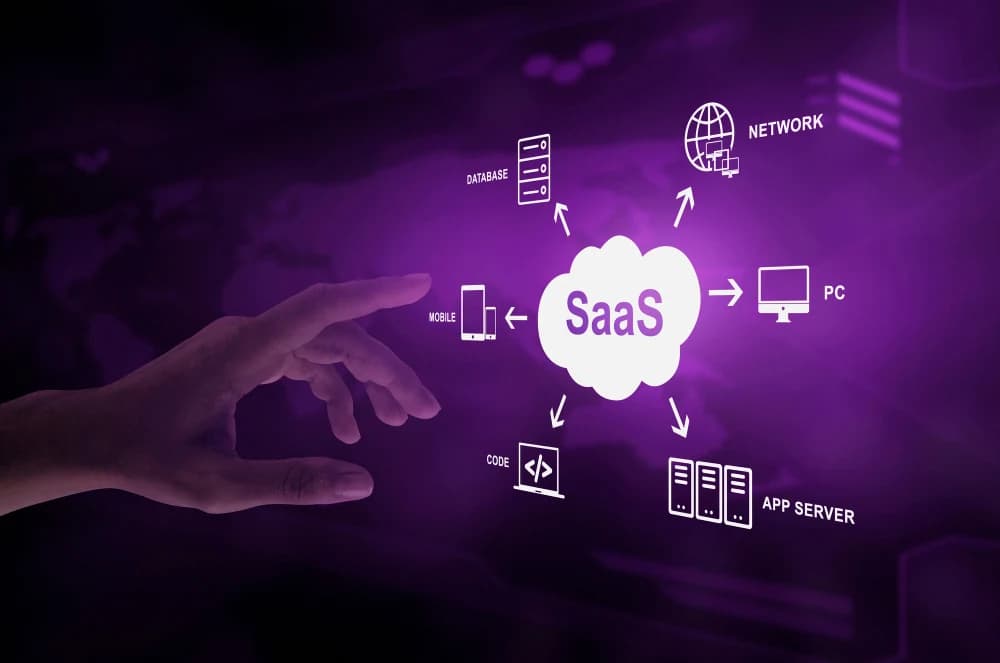
SaaS is a cloud-based software delivery model. Instead of downloading applications onto your computer's hard drive or a corporate server, the software is hosted on remote servers managed by a third-party vendor. Users access the application over the internet, typically using a standard web browser or a lightweight mobile app.
Furthermore, SaaS shifts the financial model of technology. Instead of paying a massive, one-time upfront fee to own a specific version of a program, you rent access to it through a flexible monthly or annual subscription.
How It Works: Traditional Software vs. SaaS
Feature | Traditional Software | SaaS (Cloud-Based) |
|---|---|---|
Setup | Manual installation on specific devices | Zero setup through a web browser |
Updates | Paid upgrades that require manual installation | Automatic online updates |
Cost | High, one-time upfront license fees | Monthly or yearly subscription |
Access | Tied strictly to the physical device | Accessible anywhere with internet |
Everyday Examples of SaaS
You likely interact with dozens of SaaS platforms every single day without even realizing it. They power everything from our personal entertainment to major global business operations:
Productivity Tools: Google Workspace (Gmail, Docs, Sheets) and Microsoft 365.
Communication & Collaboration: Slack, Zoom, and Microsoft Teams.
File Storage & Sharing: Dropbox, Google Drive, and iCloud.
Business Operations: Salesforce (for customer management), QuickBooks (for accounting), and HubSpot (for marketing).
HR, Payroll, & Finance: Gusto, ADP, and BambooHR (for handling employee onboarding, benefits, and payroll operations seamlessly online), plus QuickBooks Online (for cloud accounting).
Marketing & Engagement: Mailchimp (for email marketing campaigns) and Buffer or Hootsuite (for scheduling social media content across platforms).
Creative & Design: Canva (for quick, template-based graphic design), Figma (for collaborative interface design), and Adobe Creative Cloud (Photoshop and Illustrator shifted to web-accessible, cloud-stored models).
Why is SaaS So Popular?
The rapid adoption of SaaS comes down to a few major benefits for both everyday users and large enterprises:
Cost Efficiency: There is no need to invest in expensive hardware or maintain dedicated servers to run the applications.
Scalability: If an organization grows from 5 employees to 500, they don’t need to buy new software disks; they simply upgrade their subscription tier to add more user accounts instantly.
Worry-Free Security: Software vendors employ specialized cybersecurity teams to defend the data center infrastructure, manage backups, and patch critical vulnerabilities before users ever notice them.
Seamless Integration: Modern SaaS platforms are built to talk to each other. Through open APIs (software bridges), you can easily connect tools like Slack, Google Drive, and Salesforce so they share data automatically, creating a unified workflow without any manual coding.
Data Analytics and Insights: Because SaaS applications run in the cloud, they can centralize and analyze data across your entire organization in real time. This gives teams built-in dashboards, trend tracking, and automated reporting features that make it easy to make data-driven decisions instantly.
Conclusion
As businesses continue moving toward remote work and digital collaboration, SaaS will remain one of the most important foundations of modern technology. With SaaS, you no longer need to be an IT expert to use powerful, enterprise-grade software. Because the vendor handles all of the complex backend maintenance, engineering, and infrastructure, you are completely free to focus on what truly matters: simply logging in and getting your work done. This shifting landscape allows businesses of any size to stay agile, instantly adopting the latest innovations without the burden of technical overhead. Ultimately, it levels the playing field, turning cutting-edge technology into an accessible tool for anyone with an internet connection.
Recommended For You
View All
OPD Cover Full Form in Health Insurance: Meaning & Benefits
Learn the OPD full form in health insurance, what OPD cover means, its benefits, coverage, claim process and key factors to check before buying.

KYC Full Form in Insurance: Rules, Documents & Process
KYC full form in insurance is Know Your Customer. Learn about KYC rules, required documents, verification process, benefits, and key requirements.

OD Full Form in Car Insurance: Coverage & Calculation
Learn the OD full form in car insurance, what Own Damage cover protects, how OD premium and claim amounts are calculated, and how OD differs from third-party insurance.